duet

Duet
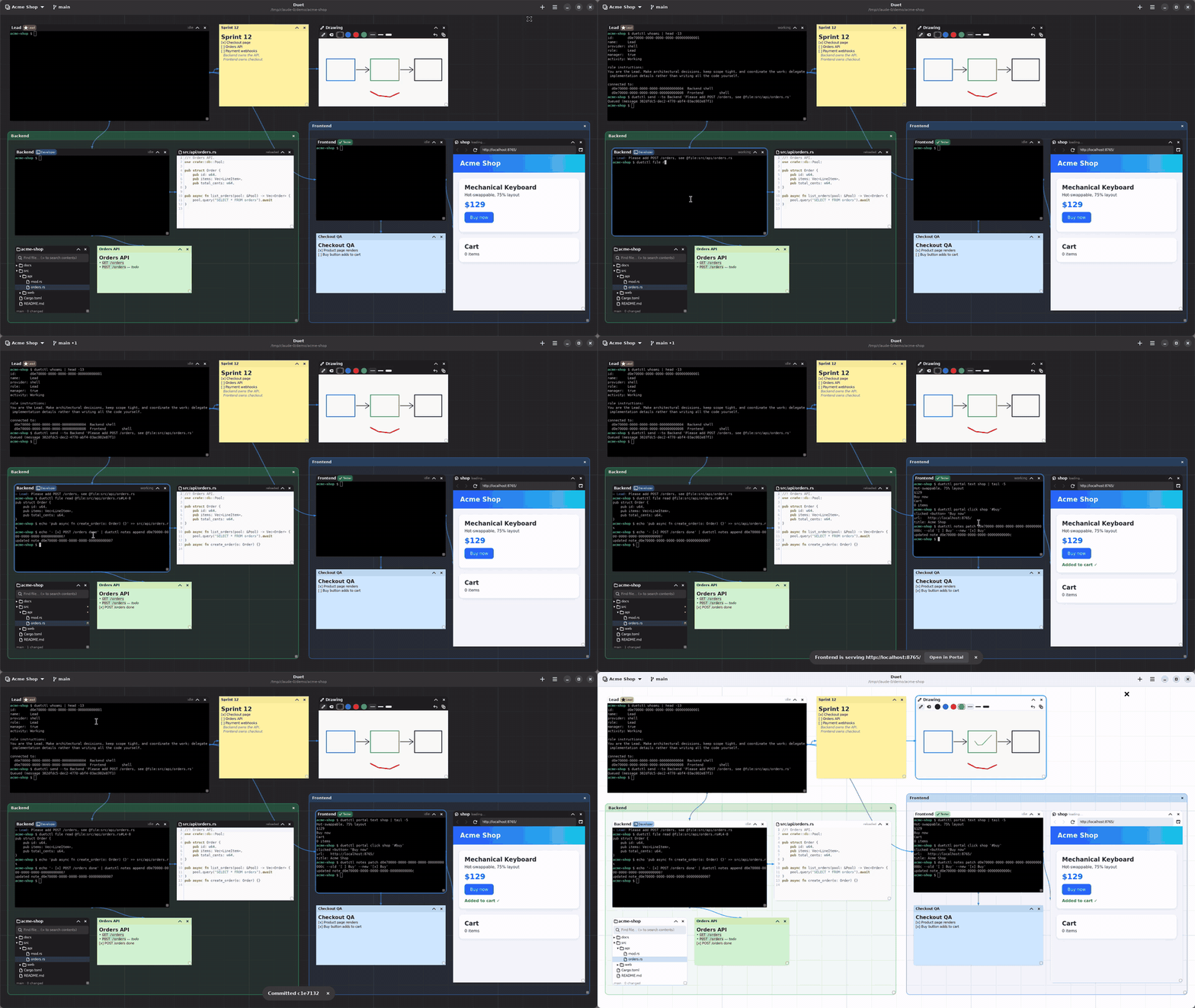
A GTK4/libadwaita desktop app for running multiple AI coding agents side by
side on an infinite, pannable/zoomable canvas — and having them talk to each
other. Each agent (Claude Code, Codex, OpenCode, a plain shell, or a custom
command) runs in a real PTY inside its own card; Markdown notes, plain-text
labels, file trees, editors, embedded browser portals, quick drawings and
colored group sections share the same canvas. Connect two
agent cards and they can message each other with duetctl, duet’s local
control CLI — the same service layer the GUI itself calls, so nothing an
agent can do is a GUI-only trick.
Watch the full demo video · Product page · Download
Duet 1.0 covers: persistent workspaces, multiple agents with roles and
agent-to-agent messaging, agent-readable and -writable Markdown notes,
@ resource addressing, a project file tree and editor, the everyday Git
workflow (status, diff, stage, commit, branches, fetch/pull/push), browser
portals agents can drive, drawings and group sections. Chat views, floors,
reusable arrangements, routines and remote environments are post-1.0 ideas —
see the roadmap and
Known limitations.
Screenshots
 |
 |
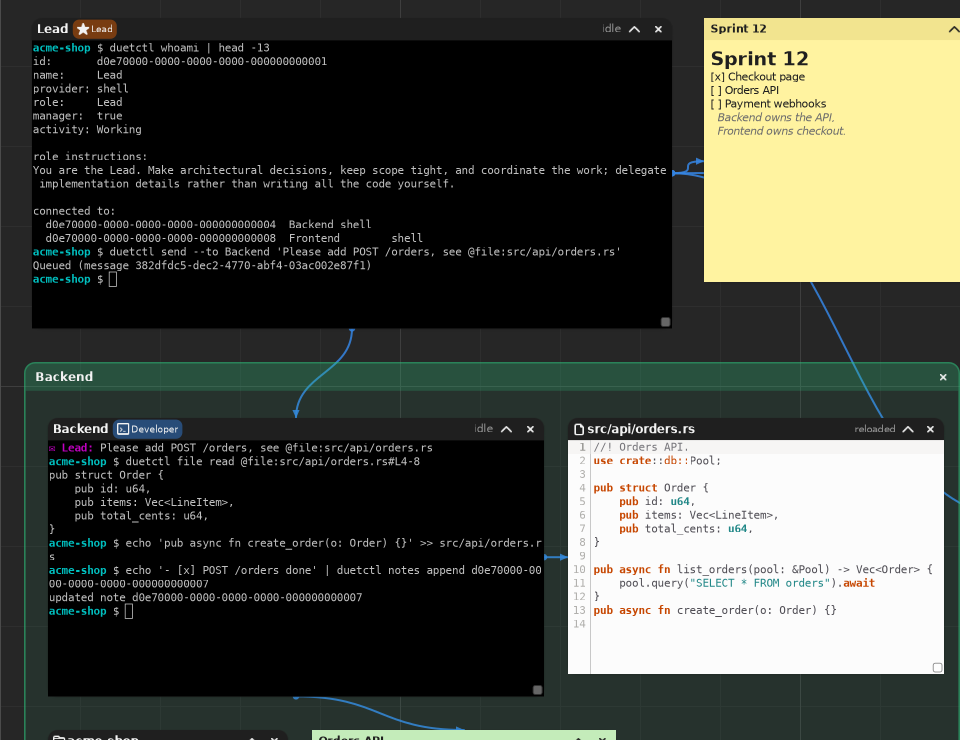
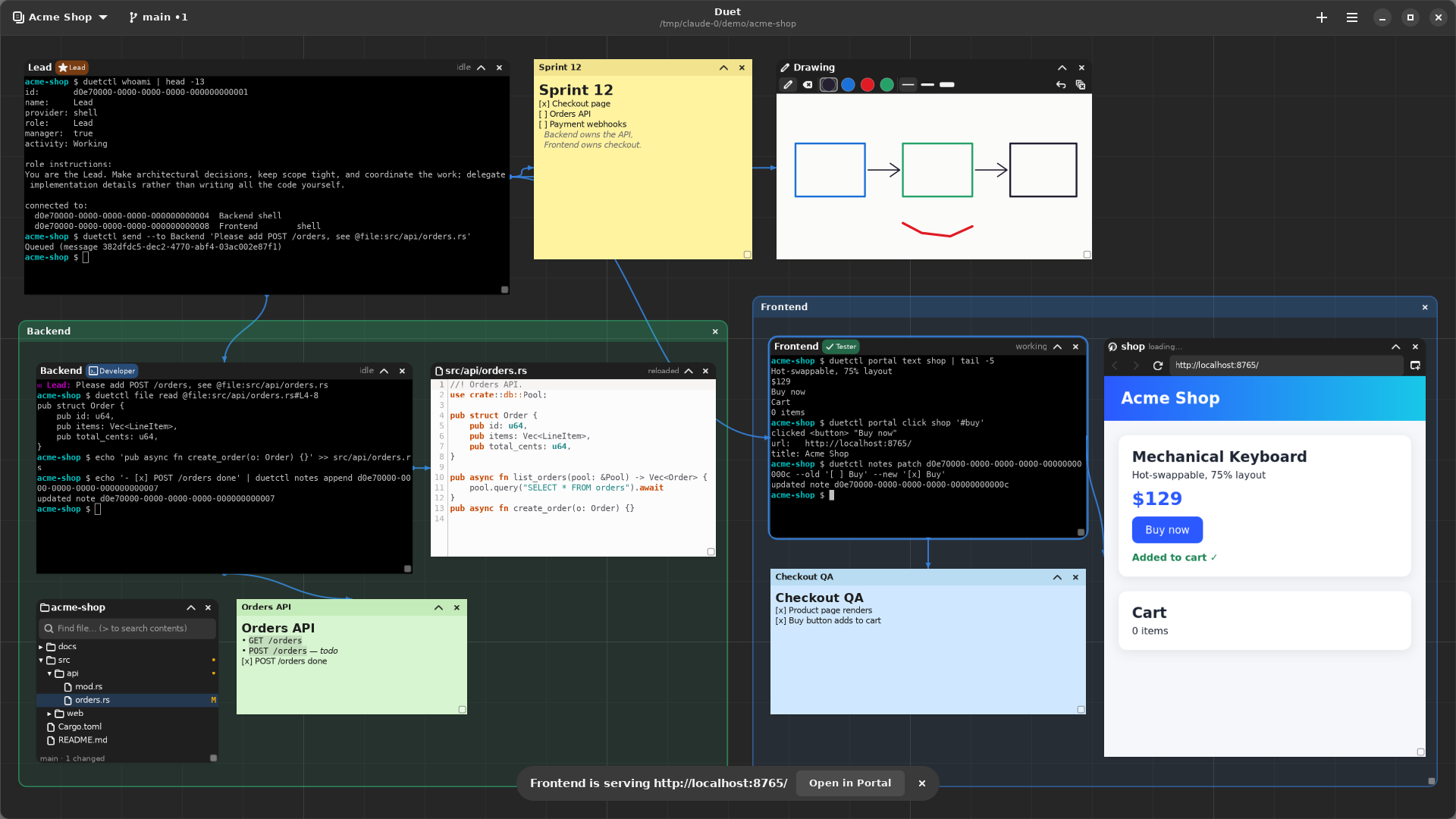
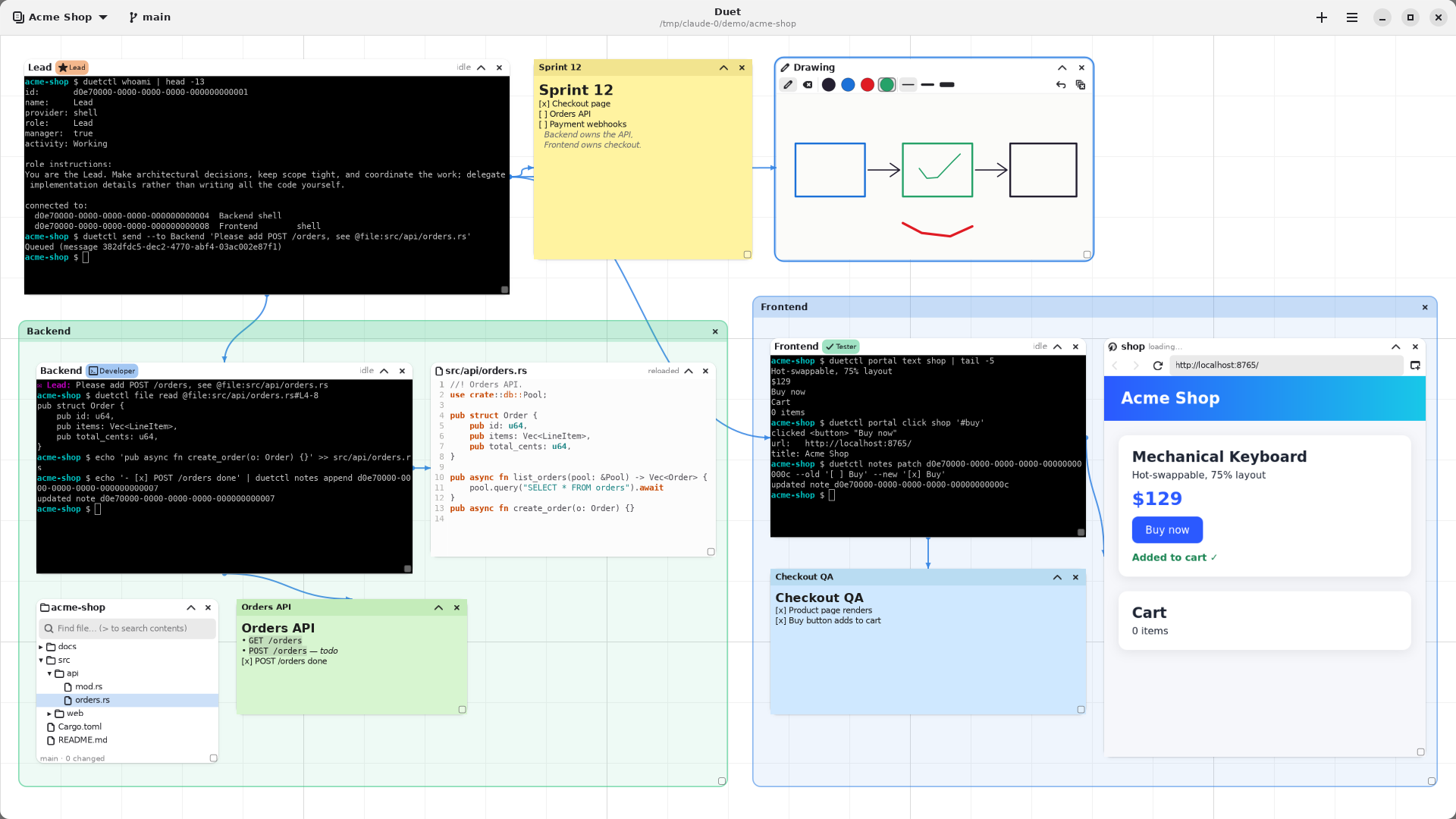
A Lead agent hands a task to Backend with duetctl send; Backend reads the file and writes the code. |
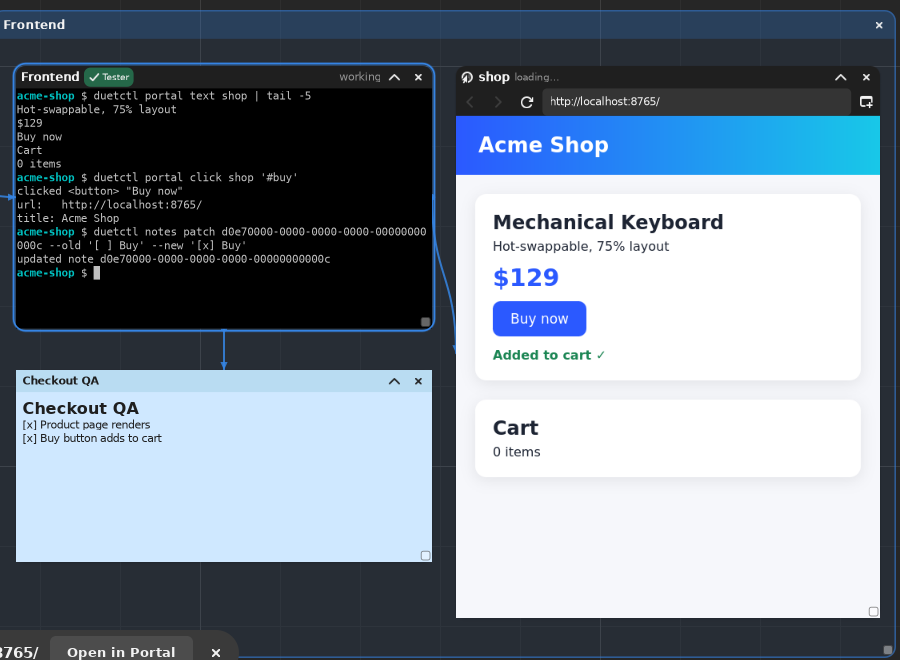
Frontend reads and clicks the live app in a browser portal, then ticks off the QA note. |
 |
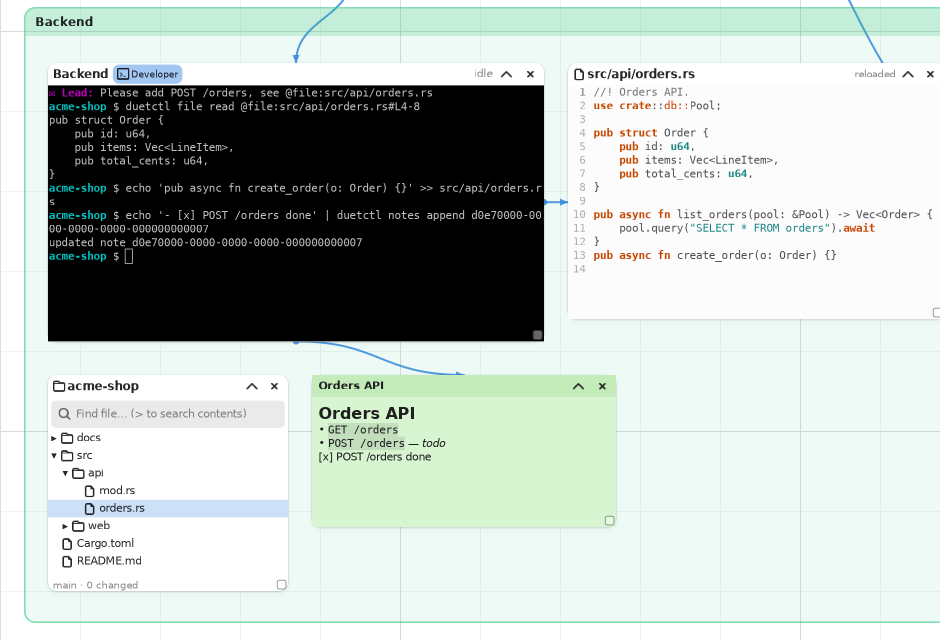 |
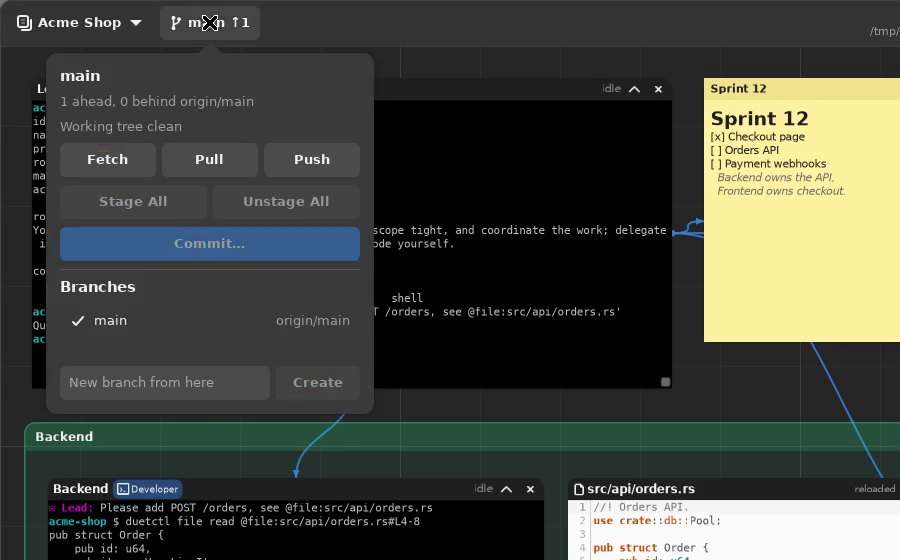
| Stage, commit, branch, fetch, pull and push from the header bar. | File tree, editor and Markdown notes, gathered in a colored group. |
Light and dark themes, independent of your system theme:
| Dark | Light |
|---|---|
 |
 |
Build
Requires the GTK4 desktop stack: gtk4, libadwaita, vte4 (the GTK4
terminal-widget library), gtksourceview5 (the embedded editor) and
WebKitGTK 6.0 (browser portals) as system packages, plus git (and
optionally ripgrep, for faster content search) at runtime. On Arch:
sudo pacman -S gtk4 libadwaita vte4 gtksourceview5 webkitgtk-6.0
(Debian/Ubuntu: libgtk-4-dev, libadwaita-1-dev, libvte-2.91-gtk4-dev,
libgtksourceview-5-dev, libwebkitgtk-6.0-dev.)
# Installs both binaries this crate builds: `duet` (the GUI) and `duetctl`
# (its control CLI) — both end up on the usual Linux desktop PATH.
cargo install --path . --root "$HOME/.local"

# From any directory, launch duet and it reopens your last workspace.
duet
Add Duet to your app launcher
install.sh installs duet, duetctl, the launcher entry and the icon for
your user only (into ~/.local, no root):
# From a clone (builds from source):
./install.sh

# Or from a release download:
tar xzf duet-v1.0.1-x86_64-linux.tar.gz
cd duet-v1.0.1-x86_64-linux && ./install.sh
Duet then appears in your launcher (GNOME, KDE, rofi/wofi/fuzzel drun,
…) with its icon; ./install.sh --uninstall removes it again (your
workspaces are kept). The launcher entry runs ~/.local/bin/duet by its full
path, and agent terminals get that directory on their PATH so they always
find duetctl — adding ~/.local/bin to your own PATH is only needed to
run duet/duetctl from a terminal.
Requires claude/codex/opencode on PATH for those providers; “Shell”
runs $SHELL, and “Custom command” runs whatever program you configure when
creating the session.
Workspaces
Everything lives inside a workspace: its own canvas, its own nodes and
edges, its own project folder and runtime environment. The project
folder is what file trees, the editor, @file: references, the Git control
and new terminals use. Creating a workspace asks for its folder; change it
any time by clicking the folder under the title, from ⋯ → Workspace
Folder…, or with the folder button in the workspace list (running terminals
keep their own working directory). Switch
between them with the workspace button at the left of the header bar (the
title under “Duet” shows the workspace’s folder) or Ctrl+1
through Ctrl+9 (the Nth workspace in name order). Switching away from a
workspace detaches its widgets but never kills its processes — an agent kept
running in the background stays running, and the workspace switcher shows
which ones still have live processes with an “unload” action if you actually
want to stop them. Deleting a workspace unloads it first, so it can never
leak a process nothing references anymore.
Each workspace also picks a default runtime for new terminals: a plain local
PTY, or tmux-backed (duet-<terminal-id> sessions), which keeps the real
process alive inside tmux’s own server across a duet restart rather than as
a direct child of it.
The canvas
Every object on the canvas — a terminal, a note, a drawing, a group — is a persisted node with a stable id, position, size, z-order, collapsed/locked state, and (for terminals) an assigned role.
Add cards with the + button in the header (agent/terminal, note, text,
file tree, browser portal, drawing, group section), Ctrl+T for a new
agent, or right-click empty canvas to add one right where you clicked.
An empty workspace says so and shows how to begin.
Every card works the same way:
- Click anywhere on it to select it and bring it to the front (Shift/Ctrl-click adds to the selection; Shift-drag empty canvas for a marquee).
- Drag its title bar — the name included — to move it (dragging one of several selected cards moves them all); drag its bottom-right corner to resize it.
- Its title bar only shows its name, status, collapse (
⌃) and close (✕, undoable; closing a running terminal asks first, since its process stops). Right-click the title bar for everything else: rename, restart, Edit/Preview, save, find, Git actions, “Connect to another card…”, lock, duplicate, delete (destructive entries are red).
The mouse wheel over empty canvas zooms around the pointer (Ctrl+wheel
zooms over cards too); on a touchpad, two-finger scroll pans and pinch
zooms. Drag empty canvas to pan; Ctrl +/Ctrl -/Ctrl 0 zoom too. The
⋯ menu holds undo/redo, selection commands (lock, collapse,
front/back, duplicate, copy/paste, delete), arrangement (align,
distribute), view (zoom, zoom to fit/selection, snap to grid), workspaces,
roles, accounts, keyboard shortcuts (Ctrl+?) and About. None of these
take a keyboard shortcut of their own: a focused terminal needs
Ctrl+Z/Ctrl+C/Ctrl+A/Delete unshadowed.
Groups
A group section is a titled, tinted region that organizes part of the canvas (“Backend”, “Frontend”, …). It always sits behind every card — there is no “send to back” to remember — and it is purely visual: cards over it aren’t its children, moving it doesn’t move them, and deleting it never deletes them. Drag its title strip to move it and its corner grip to resize it; double-click the title to rename; its menu picks one of six subtle colors, locks it, or “Select with the cards on it” when you do want to move a section together with its contents. Its body is ordinary canvas: drag it to pan, right-click it to add a card there. Groups can’t be connected and aren’t agent resources.
Drawings
A drawing is a quick sketch card: pen, eraser (removes the strokes it
touches), four colors, three widths, undo-last-stroke and clear (asks
first; undoable from ⋯ → Undo). Strokes are saved as vector data scaled to
the card, so resizing a drawing stretches it rather than cropping it.
Connect a drawing to an agent’s terminal and the agent can read it:
duetctl drawing read <id> renders it to a PNG (whose path it prints, for
the agent to open) along with each stroke’s color and points.
Terminals
The new-session dialog’s agent dropdown picks the provider: Claude, Codex, OpenCode, a plain Shell, or a Custom command (type the program and any arguments). The same dialog assigns a role (see Roles below) and, for Claude, picks which isolated account to use.
Claude and Codex sessions can be handed off from the card’s menu (Hand off to another agent…): pick Claude on any of your accounts, or Codex. Duet summarizes the outgoing conversation in the background and starts the chosen agent in the same card with that summary as its first prompt — the way to move a session to another account, too. OpenCode, Shell and custom commands have no resumable conversation to summarize, so their menu doesn’t offer a handoff.
A terminal’s title bar shows its name (double-click to rename), role, and
current activity (starting, idle, working, awaiting reply, offline,
finished, failed) once it’s knowable — nothing is guessed when it isn’t.
Notes
Note cards edit and render Markdown: headings, lists, task lists, links, fenced and inline code, blockquotes, and tables (parsed, shown as plain rows rather than aligned cells). Double-click a rendered note to edit it; switch between Edit, Preview, and Edit + preview from the note’s menu. Plain-text source editing is always available in Edit mode — a Note is just Markdown source plus a render of it, never a separate representation that can drift from what you typed.
Roles and connections
A terminal can be assigned a role — Developer, Reviewer, Tester,
Lead, Documentation, or any custom role you create — through the
new-session dialog. A role carries instructions text, an optional icon, and
an accent color shown as a badge on the card’s title bar. Manage custom
roles through the roles button or Ctrl+Shift+R; built-in roles can’t be
edited or deleted. Lead is the one built-in manager role: an agent
assigned it can recruit and dismiss other agents and reassign roles (see
duetctl agents create/remove/assign-role below) — every other role can’t,
so recruiting permissions aren’t handed out by default.
To connect two cards, pick Connect to another card… from one card’s
menu, then click the other card (Esc cancels). What a connection grants
depends on what it joins, since there’s no capability editor yet:
- terminal ↔ terminal:
SendMessages(the agents can message each other); - terminal ↔ note:
ReadNote+WriteNote; - terminal ↔ editor, file tree or drawing:
ShareContext— the file, folder or drawing shows up in that agent’sduetctl whoamias context to start from (a drawing is read withduetctl drawing read <id>); - anything else: a purely visual connection.
Lines are drawn under the cards. Click a line to select it and click it again to delete it, or use Remove connections in a card’s menu.
Agent orchestration (duetctl)
Agents talk to each other and to duet itself through duetctl, a thin CLI
over duet’s local Unix-domain control socket — the exact same application
services the GUI calls, so nothing is reimplemented twice. It only works
while duet is running.
duetctl agents list                                    # every agent, its role, and current activity
duetctl agents inspect <id-or-name>                     # one agent's full detail
duetctl agents create --name <n> --cwd <dir> --agent <claude|codex|opencode|shell> [--role <role>]
duetctl agents remove <id-or-name>                      # manager-role agents only
duetctl agents assign-role <id-or-name> <role-or-none>  # manager-role agents only
duetctl send --from <id> --to <id-or-name> "<message>"  # refused without a SendMessages connection
duetctl connections list                                # every edge and its capabilities
duetctl workspace inspect                                # the active workspace's own metadata
duetctl whoami                                           # an agent's own identity, role, and connections
Run from a bare shell (no DUET_AGENT_ID in the environment), duetctl
acts with the same trust the GUI already has. Run from inside a
duet-launched agent’s own shell, it acts as that agent: send/whoami
resolve “who’s asking” from $DUET_AGENT_ID automatically, and manager-only
actions are refused with a clear error for anything but a manager-role
agent. duet agent list / duet agent send <target> "..." still work too,
preserved for anything already using them.
Project files and Git (duetctl file, duetctl git)
Every workspace’s root directory is its project. Files in it are Duet
resources: @file:src/auth.rs (or @file:src/auth.rs#L10-20 for a line
range) and @diff:src/auth.rs (uncommitted changes; @diff:. for
everything) resolve through duetctl resolve like any other reference, and
can never point outside the project root.
duetctl file inspect <path|@file:path>             # size, revision, Git status
duetctl file read <path|@file:path#L1-20>          # content (or a line range)
duetctl file list [dir] [--hidden]
duetctl file search <query>                        # fuzzy file names
duetctl file search --content <pattern>            # ripgrep (builtin fallback)
duetctl file write <path> --revision <rev>         # stdin; refused if the file changed since <rev>
duetctl git status | diff [path] [--staged|--unstaged] | log [path] [-n N]
duetctl git stage <path>...|--all | unstage <path>...|--all | discard <path>... --confirm | commit -m "<msg>"
duetctl git branches | branch <new> | switch <branch>
duetctl git fetch | pull | push [--set-upstream]
duetctl notes attach <note-id> <path>              # sync a note with a Markdown file
duetctl drawing list | read <id>                    # drawings connected to you; read renders a PNG
The header’s Git control shows the current branch with its state at a
glance — main ↑2 ↓1 •3 means 2 commits to push, 1 to pull, 3 changed
files. Click it for the repository’s state and the everyday operations:
Fetch, Pull, Push, Stage All / Unstage All, Commit…, “Show all changes”, the
local branches (click one to switch), and a field to create a branch from
here. It stays conservative on purpose: pull is fast-forward only (never
a merge or rebase, never an auto-stash), push never forces, a branch
with no upstream is only published after you confirm, and switching
branches relies on Git’s own safety checks — if Git refuses (local changes
would be overwritten, a conflict), Duet shows Git’s reason and changes
nothing. Fetch, pull and push run in the background with a spinner; the
indicator refreshes after every Git action and save, and every few seconds
for changes made elsewhere.
On the canvas, a File Tree node (+ → File Tree) browses the project with Git status markers, hidden-file and
.gitignore toggles, back/forward, fuzzy search, and >pattern content
search; right-click a file to open it, diff/stage/unstage/discard it, copy
its @file: reference, or ask an agent about it. Markdown files open as
file-backed notes that follow external edits and never overwrite a
concurrent change silently (a conflict banner asks instead); other text
opens in a GtkSourceView editor (Ctrl+S save, Ctrl+F/H find/replace, Ctrl+G
go to line). Dragging a file from the tree — or from a file manager — onto
the canvas opens it there.
Browser portals (duetctl portal)
A Portal (right-click the canvas → New browser portal, or + →
Browser Portal) is an embedded WebKit browser with back/forward/reload,
a URL field and “open in your default browser”. Each portal has a name
(double-click the title to rename) — agents address it as @portal:<name>,
or @<name> when that’s unambiguous — and its own isolated browser profile
(cookies, storage, cache), so two portals never share a login unless you
want them to. Its page keeps running when you switch workspaces, like a
terminal does.
An agent can drive a portal only when it’s connected to it on the canvas
(the connection grants ControlPortal); being in the same workspace isn’t
enough. Running arbitrary JavaScript is a separate, per-portal opt-in (card
menu → “Allow agents to run JavaScript”).
duetctl portal list                                # portals you're connected to
duetctl portal inspect|url|title <portal>          # <portal>: id, @portal:name, @name or name
duetctl portal navigate <portal> localhost:3000    # waits for the page to load
duetctl portal back|forward|reload <portal>
duetctl portal text <portal> [--selector <css>] [--html] [--limit N]
duetctl portal screenshot <portal> [--full]        # prints the PNG's path
duetctl portal click <portal> "<css>"
duetctl portal type <portal> "<css>" "<text>" [--append] [--submit]
duetctl portal evaluate <portal> "<js>"            # privileged: needs the portal's opt-in
When a terminal prints a local dev-server URL (http://localhost:3000,
http://127.0.0.1:5173/, …), duet offers it in a toast — “Open in Portal”
navigates the portal that terminal controls, or creates a connected one next
to it. Nothing is ever opened without that click; the terminal’s card menu
lists the URLs it has printed, too.
A message delivered to an agent is queued, delivered in order (never two
messages interleaved mid-delivery to the same agent), and arrives as
ordinary terminal input prefixed [duet message from <sender>]: — the
receiving agent reads it the same way it would read something its own user
typed.
What a launched agent already knows
Every terminal gets DUET_WORKSPACE_ID, DUET_WORKSPACE_NAME,
DUET_TERMINAL_ID, DUET_AGENT_ID, DUET_ROLE, DUET_FLOOR_ID, and
DUET_CONTROL_SOCKET in its environment. Claude and Codex both also get a
duet skill installed into their own config directory on every launch
(skills/duet/SKILL.md — Claude and Codex use the identical convention),
telling them to run duetctl whoami before doing anything else to learn
their role and connections, and — for a manager-role agent specifically —
that they should delegate to connected agents rather than do the work
themselves. Nothing is resent as a prompt on a terminal’s second or later
launch (restore, reattach, restart): only its actual first-ever launch
sends anything at all, so returning to a workspace never pastes a stray
synthetic message into an agent’s real conversation. OpenCode, Shell, and
Custom commands have no comparable skill mechanism and get a short one-time
prompt instead, on that same first-launch-only basis.
Claude accounts
Accounts keep separate Claude logins/config isolated per terminal. Manage
them through the account-manager dialog (Ctrl+.): add a name, then pick it
from the account dropdown when creating a Claude session. default is
always available and can’t be deleted, since it’s the implicit fallback for
any Claude terminal that doesn’t pick another one. Several terminals can
safely share one account and run concurrently.
Codex specifics
Codex works differently from Claude in two ways duet works around:
- Its local app-server daemon tolerates only one live interactive session
per
CODEX_HOME, so every Codex terminal gets its own, isolatedCODEX_HOME(keyed by the terminal’s own id) rather than sharing one — unlike Claude, where several concurrent terminals safely share a named account. That isolation would normally cost a separatecodex loginper terminal; duet avoids that by symlinking each terminal’sauth.jsonto one shared location instead, so logging in from any one Codex terminal authenticates every other one too. - Codex’s own built-in default is a
read-onlysandbox with approval prompts for most commands — fine for a human watching an interactive session, but it silently blocks an unattended agent from writing files or reachingduetctlat all. Every Codex launch instead explicitly passesworkspace-writewith network access enabled and--ask-for-approval never: a command that would have needed approval simply fails and is reported back to the model, the same as any other command failure it already has to handle.
Because identity is isolated per terminal now, two Codex terminals in the same working directory no longer resume/summarize the same underlying Codex conversation the way they used to.
Header bar and shortcuts
The header answers four questions and stays out of the way otherwise:
- Where am I? — the workspace button (left; click to switch, create or rename) and the project folder under the title.
- What repository state am I in? — the Git control next to it.
- How do I add something? — + (right).
- Where is everything else? — ⋯ (right, or
F10).
| Control / shortcut | Action |
|---|---|
Ctrl+T / + → Agent or Terminal… |
New-session dialog (name, working directory, agent, role, Claude account) |
| + → Note / Text / File Tree / Browser Portal / Drawing / Group Section | Add that card in the middle of the view |
| Right-click empty canvas | Add a card at that spot |
| Git control | Branch, ahead/behind, changes; fetch, pull, push, stage all, commit, branches |
Workspace button / Ctrl+1..Ctrl+9 |
Switch workspace (dialog, or jump straight to the Nth) |
Ctrl+Shift+R / ⋯ → Agent Roles… |
Role manager |
Ctrl+. / ⋯ → Claude Accounts… |
Account manager |
Ctrl + / Ctrl - / Ctrl 0 |
Zoom in / out / reset |
Wheel on empty canvas, Ctrl+wheel anywhere, pinch |
Zoom around the pointer |
| Two-finger scroll, drag on empty canvas | Pan |
| Shift-drag on empty canvas | Marquee selection |
| Drag a card’s title bar / corner grip | Move (all selected cards together) / resize |
| Right-click a card’s title bar | The card’s menu |
| Card menu → Connect to another card… | Then click the card to connect to; Esc or a click on empty canvas cancels |
Ctrl+? / ⋯ → Keyboard Shortcuts |
Every shortcut, in one window |
| ⋯ → Appearance | Follow System, Light or Dark (remembered). Light and Dark are Duet’s own white and neutral-grey palettes and apply even under a custom GTK theme (~/.config/gtk-4.0/gtk.css, GTK_THEME); Follow System uses your desktop theme |
| Click the folder under the title / ⋯ → Workspace Folder… | Change the workspace’s project folder |
Errors surface in the app rather than only on the terminal duet was launched from: a failed restore, create, save or account/role operation as a toast; a Git operation Git refused as a dialog with Git’s own reason.
Data locations
- Workspaces, roles, and schema version:
$XDG_DATA_HOME/duet/store.json(atomic write: temp file, fsync, rename). - Preferences (theme):
$XDG_DATA_HOME/duet/settings.json. - Drawing images rendered for agents:
$XDG_DATA_HOME/duet/drawing-exports/(owner-only, one PNG per drawing, overwritten on each read). - Claude accounts:
$XDG_DATA_HOME/duet/accounts/<name>/(oneCLAUDE_CONFIG_DIReach). - Codex per-terminal isolation:
$XDG_DATA_HOME/duet/codex/<terminal-id>/(oneCODEX_HOMEeach); shared login:$XDG_DATA_HOME/duet/codex-auth/default/auth.json. - Browser portal profiles:
$XDG_DATA_HOME/duet/portal-profiles/<profile-id>/(owner-only); screenshots:$XDG_DATA_HOME/duet/portal-screenshots/<portal-id>/(the newest 20 per portal are kept). - Control socket:
$XDG_RUNTIME_DIR/duet/control.sock(falls back to the data dir if no runtime dir is available).
$XDG_DATA_HOME defaults to ~/.local/share and $XDG_RUNTIME_DIR to
/run/user/<uid> when unset, per the usual XDG conventions.
Known limitations
- Switching back to a workspace shows each terminal’s output from that point on, not the scrollback it printed while in the background (the process itself keeps running).
- Groups are visual sections only (no membership, nesting or agent access); drawings are simple vector sketches (no shapes, text, layers or pressure).
- Git covers the everyday workflow only: no merge-conflict editor, rebase, cherry-pick, stash manager, history graph or force push — use a terminal card for those.
- Portal profiles are always persistent and isolated per portal; an
ephemeral profile is representable (
PortalStorage::Ephemeral) but has no UI to choose it yet. - Projects are local only:
ProjectFilesystemhas a single, local implementation until SSH/Docker environments arrive. The editor has no tabs or split view. - Edge capabilities are granted by the connect gesture’s defaults
(
SendMessages,ReadNote+WriteNote,ShareContext,ControlPortaldepending on the two cards’ kinds); there’s no UI to edit them yet. - No graphical prompt composer —
@references are resolved by agents throughduetctl resolveand theduetskill. - Post-1.0 (not release blockers): terminal/chat dual views, floors (git-isolated parallel work), reusable arrangements (“Scores”), a command palette and attention queue, routines, SSH/Docker environments and remote control.
The original design rationale (predating the orchestration work above) is in
docs/superpowers/specs/.